
In SQL Server Analysis Services Time Dimension has its own importance in the overall data analysis. As we can see that the majority of the BI solution aggregate data over the time periods and hence it is an implicit part and parcel of majority of BI projects.
A SQL Server Analysis Services Time Dimension typically contains attributes that represent time periods such as year, quarter, month and day. We can implement the time dimension in Analysis Services cubes using several ways. A cube can contain more than one time dimension or can use several hierarchies from the same time dimension depending on the granularity requirements of the data.
Time Dimension Structure
The time dimension structure depends on how the time period information is actually stored in the underlying data source. There are two basic types depending on the storage of time data.
- Regular time dimension – A regular time dimension is just like any other dimension table. The dimension table holds the attributes for the specific time periods as separate columns like Year, Quarter, Month, Day etc. Fact table, like any other dimension has the foreign key relationship with the time dimension table. The key attribute can be defined either as an integer key or the lowest level of detail such as the date.
- Server time dimension – In case a separate time dimension table is not available, we can have Analysis Services define a server time dimension based on time periods. To define the hierarchies, levels, and members represented by the server time dimension, select standard time periods when creating the dimension. The attributes in a server time dimension have a special time-attribute binding i.e. the members of attributes in a server time dimension uses the attribute types that are related to dates, such as Year, Month, or Day.
Creation Methods
As I said there are several ways to create a time dimension. See the below screenshot of the Create New Dimension Wizard which provides the following option to create a time dimension. The first two options represent Regular Time Dimension and the third option represents Server Time Dimension. Let’s understand these options with a brief description and the important steps in creating them using the dimension wizard.
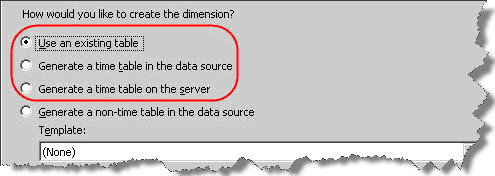
- Use an existing table – We can create a time dimension based on the table available in the source database. The table should be having the required columns to represent various levels of Calendar like Year, Quarter, Month, Date and Fiscal Calendar like Fiscal Year, Fiscal Quarter, Fiscal Month etc. as per the requirement. For e.g. refer to DimDate table in the AdventureWorksDW2008 database. This table has all the possible columns for creating the time dimension and we can select the required ones to have while creating the dimension.
Steps
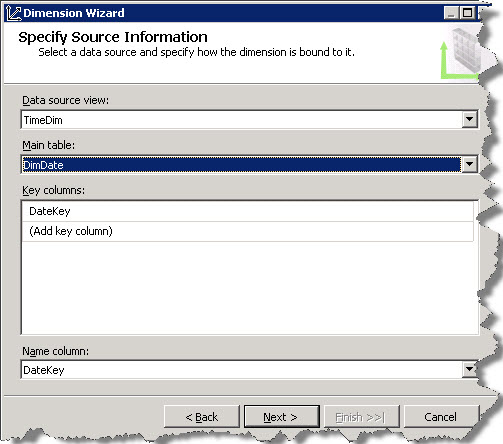
- Specify Source Information – Select the data source view and the time dimension table (DimTime). The wizard has identified the key column (DateKey). We can create a composite key by adding extra columns in the “key columns” area. Select Name column if any and click on Next…
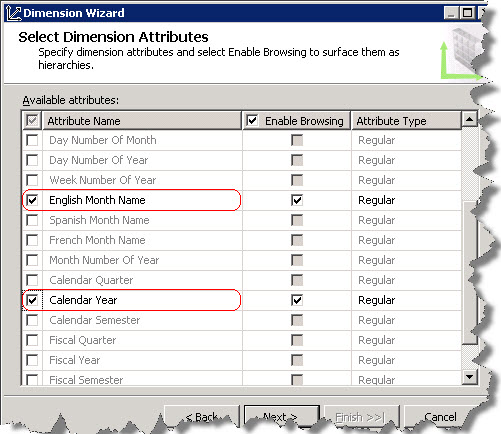
- Select Dimension Attributes – In the next screen, select the required attributes from the available attributes from within the time dimension table. Click on Next…
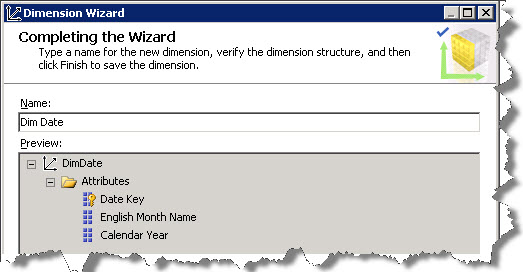
- Completing the Wizard – Review the dimension structure and specify the dimension name. Click on the Finish button and a time dimension with the name “Dim Time” will be created with attributes English Month Name and Calendar Year and Date Key.
So far, we have checked creating a time dimension based on the existing time table in the underlying database. In the next part, we will understand the next option of “Generating a time table”.
Regards
Amit Karkhanis
Like us on FaceBook | Follow us on Twitter
Join the fastest growing SQL Server group on FaceBook
