
Hello!
We at SQLServerGeeks.com are committed to spread the knowledge as we gain in the process of evaluating the newly released SQL Server 2012 CTP 3 release code named “Denali”.
In the last post, we had a short walkthrough for receiving files from an SFTP server using SSIS Execute Process Task. You can find the published content here;
In this post, we shall send files or upload files to a remote server using FTP.
We have two distinct approaches available:
- Develop a script task either in C# or in VB.NET which will perform a actions like create a remote session, perform the required action on the server and lastly gracefully exit the session
- Use a FTP Task and configure the SSIS component that suits our need
We shall use the FTP Task in the post to send files to the remote server.
Drag the FTP Task component on the designer window
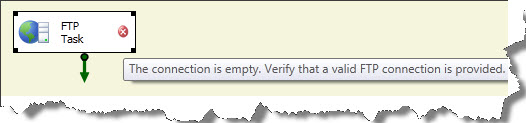
Now double click on the component. This will open the FTP Task Editor.
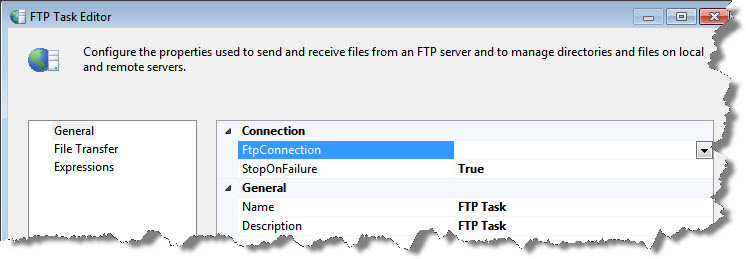
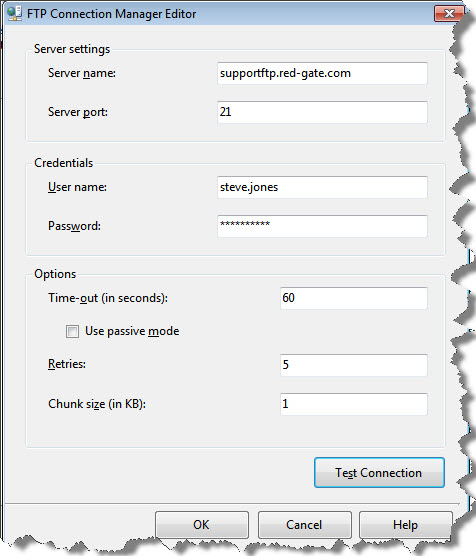
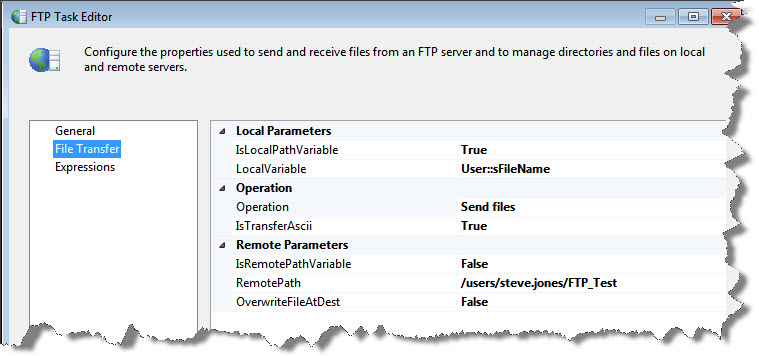
Using this window, one can establish a new FTP connection manager; configure the task for a specific FTP operation (such as Send Files, Receive Files etc.) and also add any expression to tweak the task execution.
Note:
- You may configure the FTP is passive mode by checking the option – Use Passive Mode
- Chunk Size is the size of each packet involved in the transfer. This has a default of 1KB and can have a maximum size of 1MB in SSIS. This is the upper limit. One will have to resort to designing a custom component if a larger chunk size is desired.
- Using this design, only one file can be sent to the remote destination. If this is not the requirement, then the package designer will have to introduce a looping mechanism, in order to loop over a set of files
- Also, data transfer can take place either in ASCII or in Binary format. ASCII can be used for plain text files and files which have strings numbers, on the hand if we have files such as {.zip, .exe, image files or rich text files} Binary transfer mode is to be used
- If ASCII mode is used for a binary file, the file will end up getting corrupted
Let us take up a small project to send multiple files to a remote server using FTP
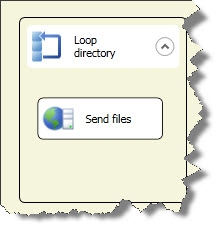
Here since we have to send multiple files, I have used a FEL (for each loop) task to loop on the directory content. The FEL and FTP task will do the following actions:
- Loop on the directory
- Pick one file and send file using FTP
- Repeat the action till all files(*.*) in the directory are FTP’ed
That’s all. Happy learning
In the next post, we shall see yet another exciting feature in SSIS which is called a parameterize the task.
Regards
Raunak Jhawar
Like us on FaceBook | Follow us on Twitter | Join the fastest growing SQL Server group on FaceBook
Follow me on Twitter | Follow me on FaceBook

How come no one has raised the issue with FTP task when sending(uploading) mutiple files to ftp sites. You can send a single file but when you use a wild card, it gives error. It will be great if anyone has example how to configure it.
I have the following configuration on FTP Task
A. Receive Files(Downloading multiple files): ==> Works Fine and will download mutiple files from ftp site
Remote parameter= /MycompanyDir/*.*
Local parameter=d:\customerFiles\
Send files: (Uploading multiple files): : ==> Failed
Local parameter=d:\customerFiles\*.*
Remote parameter= /MycompanyDir/
Thank you for visting the blog. The way out would be to loop on a directory folder and send one file at a time to the remote destination. This is showcased in the blog posted above.
Please feel free to get back incase you require any further assistance.
I am using SSIS package.
FTP Task Editor=>
IsLocalPathVarible:- True
Local Varible :- User::Final
Operation :Send Files
ISTransferASCII :- False
Remote Parameter
IsRemotePathVarible :-False
REmote Path :- \Location
OverwriteFileAtDest :- YES
Final:-D:\test20130724_230456_662000000.xls which having expression
“D:\\test”+Replace(Replace(Replace(Replace((DT_WSTR,50)(getdate()),”-“,””),” “,”_”),”:”,””),”.”,”_”)+”.xls”
But [Connection manager “FTP Connection Manager”] Error: An error occurred in the requested FTP operation. Detailed error description: The filename, directory name, or volume label syntax is incorrect. .
By Local Path, it implies a folder path and not a file path.
how to get the server port no of ftp server?
FTP works on port 22
FTP is generally defaulted at port 21 where SFTP is to port 22 (This of course implies that the defaults listening ports weren’t changed)
Hi ,
Can you post how to transfer files from SQL server table (VARBINARY) to FTP server .
I able to transfer from SQL Server to local folder using Export Column transformation and it works fine .But transferring to FTP not sure how to achieve as I am bit new to SSIS.
Thanks
hi brother,
whats the issue with when you schedule this in SQL agent jobs, FTP task doesn’t place the file, how to work with credentials to handle this in job.